2.5.1 Update Existing Index
Impulse does not support row level updates. You can overwrite partitions within a specific data range and add new data to existing index. Here is an example of how this works:
Assume you have an existing index in Impulse with the following rows:
| Date | Employee | Salary |
| 2019-01-01 | John | 6000 |
| 2019-01-02 | Sara | 6100 |
| 2019-01-03 | Smith | 6200 |
| 2019-01-04 | Bob | 6300 |
If we have the following dataset that we want to append to existing index and update the existing partitions within the period 2019-01-01 and 2019-01-03:
| Date | Employee | Salary |
| 2019-01-01 | Jessica | 7000 |
| 2019-01-02 | Sara | 7100 |
| 2019-01-03 | Simpson | 7200 |
| 2019-01-04 | Robert | 7300 |
| 2019-01-05 | Dave | 7400 |
The resultant data after the combine and overwrite of partitions within the period 2019-01-01 and 2019-01-03 will be:
| Date | Employee | Salary |
| 2019-01-01 | John | 7000 |
| 2019-01-01 | Jessica | 7000 |
| 2019-01-02 | Sara | 7100 |
| 2019-01-03 | Simpson | 7200 |
| 2019-01-04 | Bob | 6300 |
| 2019-01-04 | Robert | 7300 |
| 2019-01-05 | Dave | 7400 |
Notice that the partitions within the date range 2019-01-01 and 2019-01-03 are replaced by the the new dataset and outside this date range the data are appended to existing index.
Here are the steps to combine and overwrite the existing partitions.
- Follow the steps of ingesting files to a datasource in a warehouse
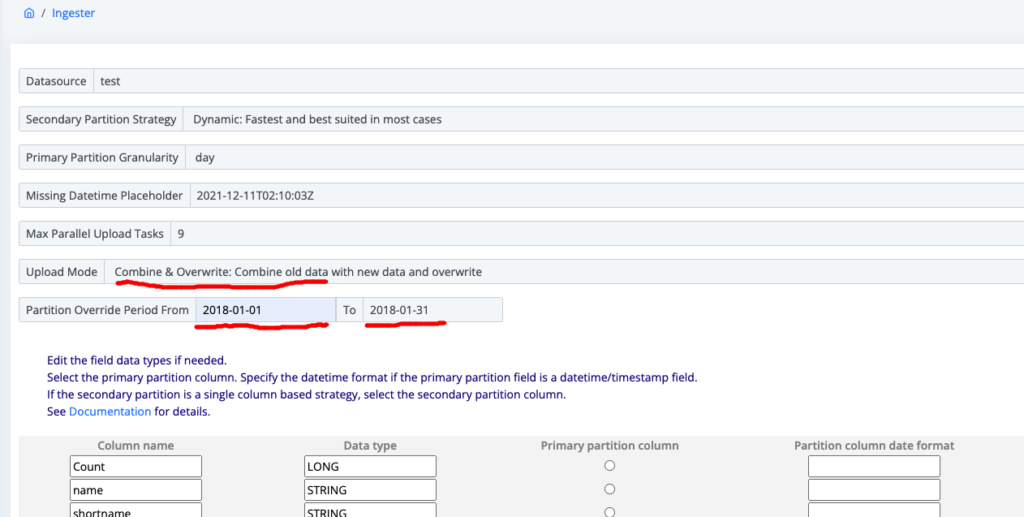
- In the step 2, select the Upload Mode as “Combine & Overwrite: Combine old data with new data and overwrite” option from the dropdown list (see Figure 2.5.1a below)
- In the partition overwrite period from and to fields, fill out the data range that you want your new data to update to.
- Follow the remaining steps of ingesting data into Impulse.