
Documentation
-
Momentum
-
MLOps
-
Impulse EDW
-
- 2.1 Create a Warehouse
- 2.2 Edit Warehouse
- 2.3 Datasources In Warehouse
- 2.4 Ingesting Data Into Tables or Datasources
- 2.4.1 Ingesting From Momentum Data Pipeline
- 2.4.2 Uploading File Using Impulse UI
- 2.4.3 Ingesting From External File/Storage System
- 2.5 Add Data to Existing Tables
- 2.5.1 Update Existing Index
- 2.6 Delete Table Records (Rows)
- 2.7 Delete Tables or Datasources
- 2.8 Monitoring Indexing Tasks
- 2.9 View Datasource Stats
-
Inset BI
- Alerts and Reports
- Connecting to a new database
- Registering a new table
- Creating charts in Explore view
- Manage access to Dashboards
-
- Articles coming soon
-
- Articles coming soon
-
- Articles coming soon
-
- Articles coming soon
-
- Articles coming soon
-
APIs
- Articles coming soon
< All Topics
Print
Model Exploration
To explore the model and view its metadata:
- From the model registry page, click the Model Artifact icon,
, corresponding to the model you wish to explore.
- The next page displays the model metadata.
- The model metadata page also shows, depending on the model type, the following:
- Model Upload API to upload a new version of the model programmatically
- Model Artifact API to retrieve the model metadata programmatically
- Model Prediction API to predict from this model by passing the input data to it.
Figure 4.4 shows the model metadata exploration page. Notice the top menu options on this page.
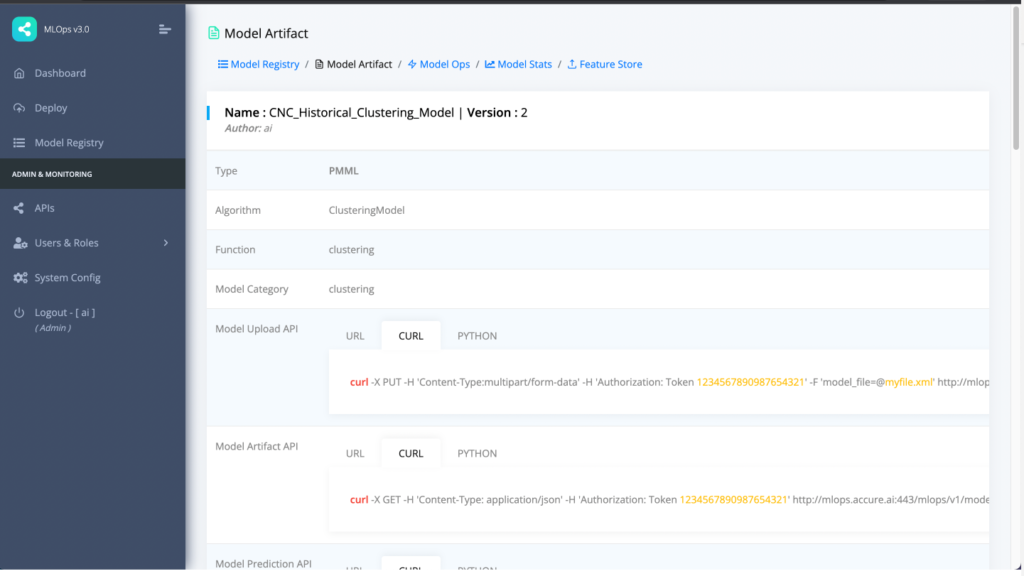
Figure 4.4: Model metadata or artifact page
Table of Contents