Documentation
2.4.3 Ingesting From External File/Storage System
Impulse supports ingesting data from the following external file systems:
- Amazon S3: Ingest a file of files stored in S3 bucket. This is the default storage system if Impulse is running on Amazon EC2 or you purchased the impulse license from the AWS Marketplace.
- HDFS: Ingest file or files stored in Hadoop Distributed File System (HDFS)
- Momentum: Ingest data from Momentum storage. Momentum provides a highly scalable ETL, including data ingestion from a wide variety of sources, transformation, cleaning, blending, and merging with multiple sources. It also allows ingesting data in automated fashion and creating indexes in Impulse.
- Google Cloud Storage: This is the default storage system if Impulse is running on Google Cloud.
To ingest data from the external system, follow these steps:
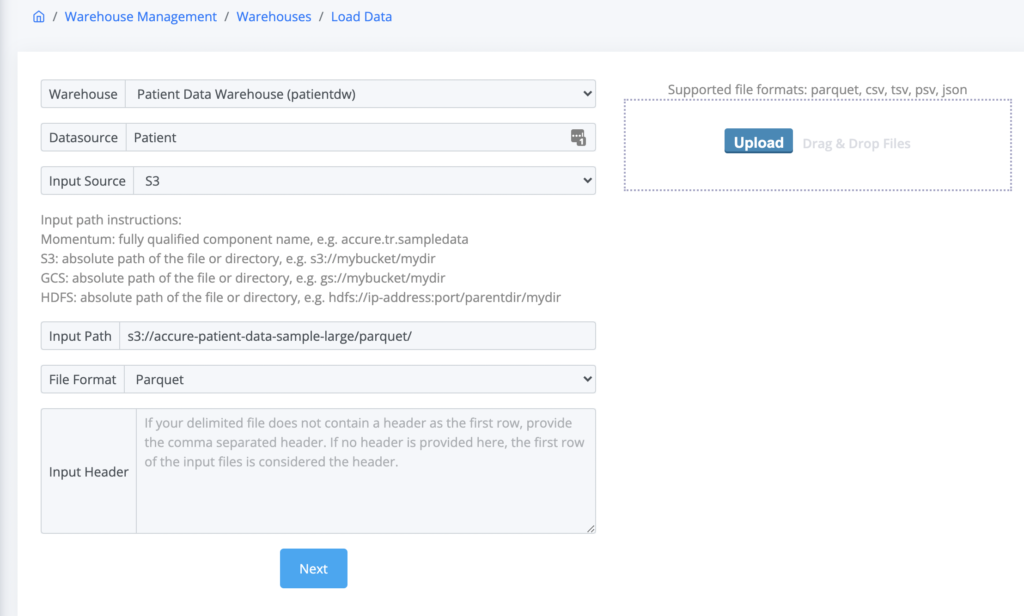
- From the main navigation menu, click “Load Data” (See Figure 2.4.3a below as an example)
- Fill out the form:
- Warehouse: Select the warehouse from the drop down options
- Datasource: Enter the table or datasource name.
- Input Source: Select the external system to ingest data from.
- Input Path: Provide the fully qualified path to the data directory or a single file. For example:
- Momentum: fully qualified component name, e.g. accure.tr.sampledata
- S3: absolute path of the file or directory, e.g. s3://mybucket/mydir
- GCS: absolute path of the file or directory, e.g. gs://mybucket/mydir
- HDFS: absolute path of the file or directory, e.g. hdfs://ip-address:port/directory/path
- File Format: Select the input file format
- Input Header: Enter a comma separated list of header columns if the input format is CSV, TSV or PSV and the input files do not contain the header in the first line.
- Click Next and follow the Step 2 as described in the previous section Uploading File Using Impulse UI