
Documentation
-
Momentum
-
MLOps
-
Impulse EDW
-
- 2.1 Create a Warehouse
- 2.2 Edit Warehouse
- 2.3 Datasources In Warehouse
- 2.4 Ingesting Data Into Tables or Datasources
- 2.4.1 Ingesting From Momentum Data Pipeline
- 2.4.2 Uploading File Using Impulse UI
- 2.4.3 Ingesting From External File/Storage System
- 2.5 Add Data to Existing Tables
- 2.5.1 Update Existing Index
- 2.6 Delete Table Records (Rows)
- 2.7 Delete Tables or Datasources
- 2.8 Monitoring Indexing Tasks
- 2.9 View Datasource Stats
-
Inset BI
- Alerts and Reports
- Connecting to a new database
- Registering a new table
- Creating charts in Explore view
- Manage access to Dashboards
-
- Articles coming soon
-
- Articles coming soon
-
- Articles coming soon
-
- Articles coming soon
-
- Articles coming soon
-
APIs
- Articles coming soon
< All Topics
Print
Sharing Model
Model can be shared with other users within the same organization. Only the admin and model owners can share their models with other users. See the “User and Role Management” section for details on the roles and privileges.
To share a model:
- If you are on the Model Registry page, click on the sharing icon
corresponding to the model you want to share.
- This will launch a modal window. Search the user you want to share this model with.
- Click on the icon
corresponding to the user you want to share this model with.
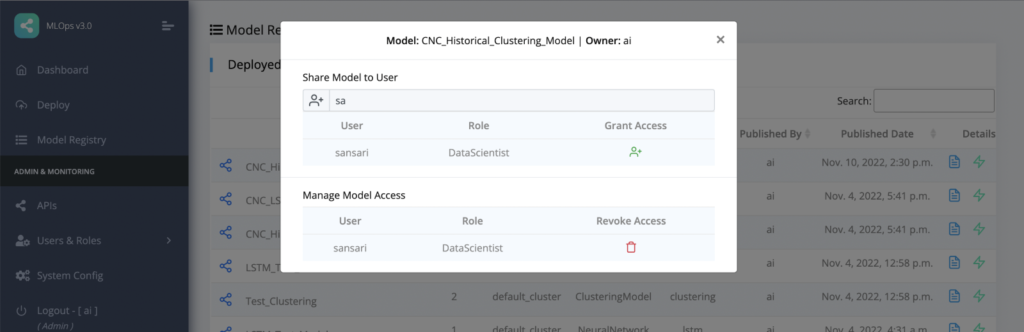
Figure 4.9: Model sharing
Unshare or Revoke Access to Model
As shown in Figure 4.9, if a model is already shared with a user, a delete icon is displayed with the user name. Clicking the delete icon will unshare the model with that user.
Also see “Model Access Management” user the section “User and Role Management”.
Table of Contents